
Here are the key insights and lessons learned by Can Uzer and the team on how to make a great-sounding game with minimal resources:
Created by 3rd Eye Studios, Downward Spiral: Horus Station lures players through a lost space vessel abandoned by its crew. The game features no dialogue or cinematics, the focus instead being placed heavily on environmental storytelling. Players have to piece together the plot through observation and interpretation as they navigate the derelict space station, accompanied by an atmospheric sound design and electronic ambient soundtrack (composed by platinum-selling HIM frontman Ville Valo). The game is coming for PS4 on September 18th, and already available on Steam.
The sound of the six-hour-long journey in the vast corridors and halls of Horus Station (HS) was completed in a relatively short time for a game of such scope and with a considerably small team. I was mostly taking the role of designing and implementing with a minimal audio tool kit, with invaluable help from Mikko Kolehmainen at the busiest times. Consequently, we have some tips that will hopefully be helpful for anyone who is as crazy as us in undertaking any big game audio project with minimal resources.
A big thanks to Mikko Kolehmainen, Greg Louden and Ava Grayson who helped and encouraged me writing this article!
Define the style well in advance and stick with it
Create a solid vision and style from the start by identifying strong benchmarks and making fast prototypes.
Create a solid vision and style from the start by identifying strong benchmarks and making fast prototypes. This can be done by creating linear audio demos or designing a small area of the level with a single enemy and weapon. This type of demo will convey your vision of how the general sound atmosphere will be, as well as illustrate core mechanics with solid examples. It will help you to express your vision clearly to the creative decision makers in the team—since it is often harder to talk about sound, it works better to have a solid example—and get confirmation on the style before proceeding with production.
Once the style is defined, it is important to stick with it throughout and make all areas of the sound coherent and consistent. For example, in HS, we aimed to avoid hi-tech-sounding sci-fi, instead opting for more mechanical, simple, or even retro sounds. This anchor point was then reflected in the sound design of all the weapons, items, and enemies, as well as all the interactive objects within the world. For weapons and tools, mechanical sources such as gears, servos, hydraulics, levers, and switches were biased, whereas buttons and consoles all around the station had more digital ingredients while still retaining the analogue vibe. Enemy drones featured lots of vocal-like elements.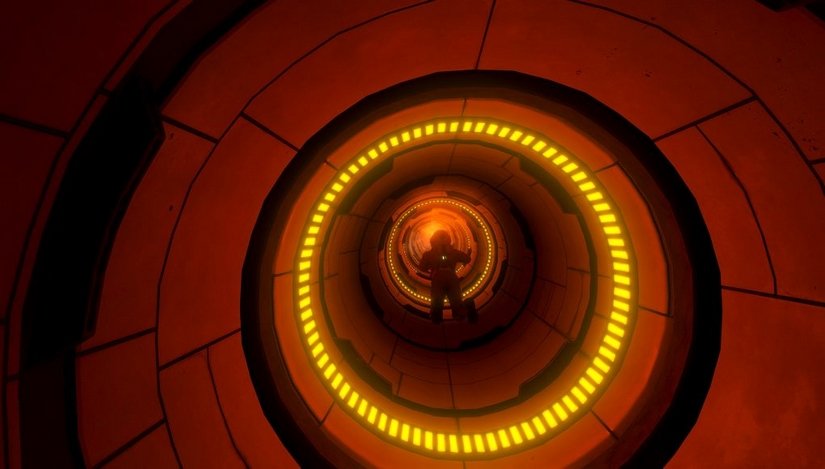
Choose your battles
It is not always feasible to pay equal attention and care to all areas of the sound. Therefore, it is crucial to pick the elements that feel the most essential for the game and focus your efforts on those. Of course, this is a decision that should be taken in tandem with other creatives in the team.
From the get-go, it was obvious for us that the essence of HS lay in the atmosphere. We put lots of thought and time into making the ambience and environmental sounds carry the weight of the experience. To support faster implementation, we even created dedicated ambience and environment tools (more on this later). The music was another pillar that would sell the experience: we chose an unconventional approach, using non-game-like music tracks with ‘songs’ that have a more traditional structure (also fitting well with Ville Valo’s composing style). We then used these tracks rather sparingly to enhance the mood in important encounters. It is also worth mentioning that some encounters were more important than others, so we identified those moments and put more time polishing them while simplifying others.
Small and frequent iterations
A production aspect we religiously practiced in HS was defining small chunks of audio work and setting several micro-milestones for iteration.
Being agile is arguably the most significant factor in successfully completing the audio, but it’s not always as straightforward as using Kanban boards and keeping a good backlog of tasks. A production aspect we religiously practiced in HS was defining small chunks of audio work and setting several micro-milestones for iteration. To illustrate, I would deliberately give myself two days to finish a certain mechanic (such as a specific weapon). The first iteration would take half a day, and it would include making only one variation for the most important aspect of the sound (in this case, a firing sound) and already implementing it in the game. This would be a single layer sound for simplicity. This element would then be reviewed by our lead designer (in many cases others would offer their opinion as well) and, if approved, I would carry on adding more layers or variations of the sound (reloading, equipping, etc.) and polishing the implementation. There would most likely be other test-feedback cycles within those two days. This way, we made sure that we took the right steps with the design: no work time is wasted. This approach would also force me to avoid fooling around and finish the task in time.
Another tip is to work on a certain aspect with the sound team as a whole to finish it off quickly and move on to the next thing. This works really well with level-specific sounds and encounters. Similarly, you can work with coders, artists, or designers at the same time to simultaneously take care of all aspects of the same element. Of course, this approach requires you to politely book their time in advance, being careful to avoid clashes by not working on same files simultaneously.
To recap: dissect the work in smaller chunks and set time limits for each of them. Start implementing early with simplified versions, test together with your supervisors very frequently, and get solid feedback, and finally, sync your work with others.
In-game footage from the PC version
Constant communication with the team
Feedback coming from the testers helped me decide to tweak the lengths of these elements to a ‘sweet spot’, where an element both sounds good and optimally serves the gameplay.
It definitely pays off to keep close and frequent communication with other departments. In HS, there were a lot of instances where the constant exchange of ideas from the sound perspective shaped some design elements or vice versa, thus saving us a ton of precious time. One good example was how we built a mechanic using sonic feedback in a level where the player gets to dock the spaceship using a console. The sonification of this mechanic gave our designer and programmer another perspective on this specific interaction. Another example: we fine-tuned the timing of some weapon-specific mechanics, such as the rate of fire of the ‘Bolt Gun’ and the recharge time of the ‘Railgun’. These mechanics had longer sounds in the beginning, but ongoing discussions with our designer and the feedback coming from the testers helped me decide to tweak the lengths of these elements to a ‘sweet spot’, where an element both sounds good and optimally serves the gameplay.
Needless to say, such exchanges require a certain level of trust, and the surest way to get there is to build good friendships. Sometimes working in game audio can be like being in a band: The closer your are with the crew, the more unified your music has the potential to sound.

Align with other departments
Aligning yourself frequently with programmers also helps a ton. Some issues regarding how certain mechanics are scripted become apparent only when you add sound to them. If my memory serves right, we didn’t realize that a specific enemy (called ‘Siege Drone’) wasn’t killed properly by the code until I had added the death sound to it. I could have wasted precious time figuring out why the heck it didn’t stop playing an idle loop after dying, but politely asking our programmer to check saved that time for me to move on to other things.
The last thing you want during a fast-paced game production is conflicts in the code caused by working on the same file. This usually happens when two or more people are working on the same ‘scene’ (in Unity jargon). To avoid such black holes, we were constantly checking in with the level artists to make sure that we were always working on different levels. I would even go one step further, marking my calendar with the weeks we would be working specific levels. Timing was not always precise as we envisaged, so we would frequently update each other on our progress.
Detailed planning, workflows, and guidelines
I can’t stress enough how much planning and guidelines helped deliver the audio production in HS. Apart from the scheduling and milestones mentioned earlier, I made many guidelines in order to create a smooth workflow.
The less fiddling you have to do in the engine in terms of mixing, the more sanity you will retain at the end of the day.
One major factor was how loud and in what format we exported assets, as well as how we imported them in Unity. Every type of sound had a strict peak and average loudness level (weapons, bullets, quiet and loud environmental sounds, game tells, etc.). This is a method I learned while I was working for Remedy, and I’m so grateful for it. Having your assets already levelled according to a standard gives you a much better starting point for mixing in the game engine. I found that the less fiddling you have to do in the engine in terms of mixing, the more sanity you will retain at the end of the day (especially if you don’t have a powerful audio engine such as Wwise or FMOD). Having constant levels per sound type also gives you the ability use a limited set of distance attenuation presets in the engine, thus resulting in consistent levels and less need for tweaking.
We followed a strict naming convention, which was imperative for swapping assets. Although destructive, it was super fast to bounce a new version of an asset and replace the old version in the assets folder. Strict naming is also extremely useful when you need to quickly find a set of sounds in Unity and make batch edits to them. We even had a dedicated tool for this, thanks to our code thaumaturge (ie. lead programmer) Tapio Vierros.
Similar rules were applied to different categories of file formats to export in, in addition to what values to set while importing to Unity per sound type (such as loading type and compression settings). When it comes to mixing, I made a color-coded schema that outlined all the mixing and ducking hierarchy down to all the different game states and some real-time effects, even before I made a single sound asset. It looked like a messy dish of spaghetti in the end, but it definitely helped me in having less of a headache when it came to the mixing, which is always an ongoing process.
Last but not least, Mikko and I decided to use the same DAW (REAPER) and mostly similar plug-ins for the sake of consistency and simplicity. It allowed us to easily swap sessions and build on top of each other’s work. When we really wanted to use a special plug-in, we would freeze it before saving the session, so the other person could still work on it. This practice naturally limited us to using a finite number of plug-ins. This limitation was another aspect that made us work faster, since there was less chance of fiddling around. Similarly, I was limiting my repertoire of sound libraries by making micro sound databases in REAPER’s Media Browser for each sound effect type. This would limit the time I spent browsing sounds, while also contributing to designing consistent sounds per category (ambiences, weapons, etc.).
Turn limitations into advantages
There are different limitations in each project, so the trick is to identify those limitations early on and find ways to turn them into advantages.
Due to internal policies with HS, we chose to not use a third-party audio middleware. Instead, we built a few custom audio tools within Unity’s own audio engine. I was lucky to be involved in the this process during the pre-production, allowing me to request the essential features we would need. Having prior experience with multiple audio middleware definitely helped me to identify these features. There are different limitations in each project, so the trick is to identify those limitations early on and find ways to turn them into advantages. In the case of HS, I wanted to have the most scalable and systemic tools possible in order to cope with the scope of the game.
My favourite tool we built for HS was the ‘ambience zone’. It is a game object which can contain up to six mono sources, and it can retain the geometric shape of any other object (such as a room) with a button press. It could also connect itself to any reverb channel that existed in the mixer, and supported occlusion points that would cause the object to be bypassed when the player is outside of the zone. Multiple zones could be blended for creating transition zones or small ambience pockets in bigger areas. It could even follow the listener with adjustable strength, which was a great way to implement ambiences to long tunnels or corridors. We used this tool to conveniently populate both generic and unique areas in the game with surround ambiences.
Another scalable tool was the ‘audio provider’. An audio provider was the most essential unit of our audio system. It had several properties including pitch, volume, filters and attenuation (all randomizable except the latter), not unlike Wwise’s containers. It also supported inheritance of properties, so I would make master providers per type of sound, and then make each sound in that type inherit selected properties from it. We had another tool called ‘audio window’ that allowed us to monitor and bulk edit any sounds or providers in the game. Combined with the inheritance system, bulk editing was a breeze.
Even with these tools, there were moments where I felt like hitting a wall. Most of the time, I managed to find workarounds, but sometimes it was just easier to kindly ask our programmer to add an extra feature here and there instead of brute-forcing my way out of a limitation. A great example from this project: we were placing dual-mono stereo files manually in the world, and it was not obvious to me from the start that this would be a problematic area. Later on, we realized that this manual implementation was quite cumbersome and flawed. We asked Tapio to build us a simplified version of the ambience zone tool that would play left and right channels of a dual-mono stereo track in sync and support adjusting the stereo width. Even though it was at a late stage in the production, this addition was well worth the effort.
Work smart, not hard
The game’s lead designer, Greg Louden, would say things along the line of “Don’t kill yourself…if it’s too much work, we’ll cut the scope down” whenever he saw me doing overtime.
This one is especially relevant for solo sound designers doing indie projects. Sometimes we compare our work with ultra high-budget AAA projects and feel discouraged, because we are not able achieve the quality we want in all aspects of the sound. There’s nothing wrong in aiming high, but if you aim for a higher production value than a single person can humanly achieve, you will stretch your resources thin and the overall quality of your work will be reduced. Instead, I find it much more sensible to discover what you can do differently and really make it shine. In the case of HS, we focused our efforts on creating a desolate and derelict soundscape, and I believe it paid off well in the end. I couldn’t be as sensible as I was without the ridiculously human-focused team that I had the privilege to work with at 3rd Eye. For instance, the game’s lead designer, Greg Louden, would say things along the line of “Don’t kill yourself…if it’s too much work, we’ll cut the scope down” whenever he saw me doing overtime. This type of encouragement really helped me not to overshoot and keep things in line with reality.
Of course you should work hard when you need to, but I find it more effective in the long run to rest and eat well, keep your creative energy high, and genuinely enjoy the work you do. This is the only way I know to be sustainably productive. So, either be lucky like me and find a great team to work with, or take the initiative to create awareness for yourself and those who are around you!
A big thanks to Can Uzer for sharing audio workflow tips that helped make Downward Spiral: Horus Station a success!